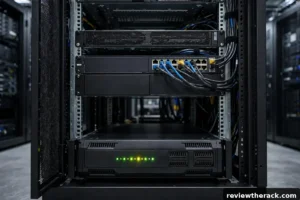
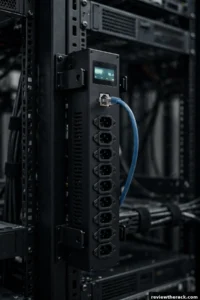
If you are buying a power distribution unit for your server rack and staring at a spec sheet full of C13, C19 and NEMA 5-15R outlets, here is the short answer: most of your equipment will plug into C13 outlets, anything with a big power supply needs C19, and NEMA is the wall-side standard you will meet in North America. Get the mix wrong and you will end up with a brand-new PDU that cannot power your most expensive server — a mistake that is surprisingly easy to make, because the plugs look almost identical at a glance.
This guide explains each outlet type in plain language, compares them side by side with real ratings, and then works through a real 12U homelab rack to show you exactly how to count the outlets you need before you buy.
Key Takeaways
- C13 is the standard outlet for most rack equipment: servers, switches, routers and NAS boxes, rated at 10 amps.
- C19 is the bigger, higher-current outlet for power-hungry gear such as blade chassis, GPU nodes and large UPS units, rated at 16 amps.
- NEMA outlets (5-15R, 5-20R, L6-30R and others) are the North American wall and circuit standard; in a rack they usually appear on the PDU’s input side, not as device outlets.
- Count your C13 and C19 devices separately, add 20 percent headroom, and only then choose a PDU — never buy on total outlet count alone.
- A C13 plug physically cannot fit a C20 inlet and a C19 plug cannot fit a C14 inlet, so the wrong PDU cannot be fixed with an adapter you already own.
C13/C14: The Standard Server Connection (10 Amps)
The C13/C14 pair is the connection you will see most often in any rack. The C13 is the female connector on the end of the power cord; the C14 is the male inlet built into the equipment. This is the same three-pin connector shape that has powered desktop PCs for decades, and it remains the default on 1U and 2U servers, network switches, routers, NAS units, rack-mount monitors and KVM switches.
Under the international IEC 60320 standard, a C13/C14 connection is rated at 10 amps at 250 volts. In North America, UL-listed cord sets are commonly rated at 13 amps at 125 volts, or 15 amps for some heavier cords. In practical terms, that covers any single device drawing up to roughly 1,200 watts on a 120-volt circuit, or up to 2,400 watts on a 240-volt circuit — far more than a typical 1U server, switch or storage box actually draws.
The reason C13 dominates is simple: it is small, cheap, and universal. A vertical 0U PDU can fit 21 or more C13 outlets in the same strip that would hold only a handful of larger connectors, which is why high-density PDUs are built around them. If every device in your rack uses a C14 inlet, a C13-only PDU is fine — but check before you assume, because one high-draw device changes the whole calculation.
The C15 exception you should know about
There is one lookalike worth knowing. The C15 connector shares the C13 pin layout and the same 10-amp rating, but it is rated for 120°C instead of 70°C, and it has a small notch in the body. It exists for equipment that runs hot at the inlet, such as some enterprise switches and power supplies. A C15 cord fits a standard C14 inlet, but a standard C13 cord will not fit a C16 high-temperature inlet — the keying blocks it. If a device manual specifies C15, buy the C15 cord; using a C13 there is a genuine safety issue, not just a fit problem.
C19/C20: When Your Gear Draws More Power (16 Amps)
The C19/C20 pair is the bigger sibling. The C19 female coupler is physically larger than a C13 and keyed so the two cannot be mixed up: a C19 cord will not fit a C14 inlet, and a C13 cord will not fit a C20 inlet. Under IEC 60320 it is rated at 16 amps at 250 volts, and North American cord sets are commonly listed up to 20 amps at 125 volts.
You need C19 outlets when a device’s input current exceeds what C13 can safely carry — roughly anything drawing more than 10 amps continuously. In practice that means blade server chassis, GPU compute nodes, high-density storage arrays, large UPS units above 1,500 VA, and high-capacity PDU inputs. A single GPU node with a 1,600-watt power supply, for example, can pull around 13 amps on a 120-volt circuit, which is already past the C13 ceiling.
This is where most buying mistakes happen. A buyer counts “24 outlets” on a PDU spec sheet, orders it, and only discovers during installation that their one GPU server has a C20 inlet and there is not a single C19 outlet on the strip. The fix is either a different PDU or an ugly adapter — and adapters on high-current circuits are exactly the kind of shortcut that causes warm connectors and tripped breakers.
Locking C13 and C19 cords
One more variant worth a mention: locking C13 and C19 cords. These have a small spring-loaded clip that latches onto a notch on the inlet, so a cord cannot be accidentally pulled out when someone is working in the back of a rack. The electrical ratings are identical to the non-locking versions, and a locking C13 mates with any standard C14 inlet — no special equipment needed. For a rack that gets touched often, or a homelab in a shared space, locking cords are cheap insurance against an accidental unplug taking a server down.
NEMA Outlets: The North American Wall Standard
NEMA is a different family altogether. Where IEC 60320 covers the equipment end of the cord, NEMA WD 6 covers the wall end — the plugs and receptacles used in North American buildings. You will meet NEMA on the input side of your PDU and on the wall receptacle your rack plugs into, and sometimes as outlets on a PDU itself.
The common NEMA receptacles you will encounter in rack power are:
- NEMA 5-15R — the ordinary 15-amp, 125-volt household-style receptacle. Found on small 1U horizontal PDUs and basic power strips. Fine for a couple of low-power devices, useless for a full rack.
- NEMA 5-20R — the 20-amp, 125-volt version, recognizable by the T-shaped slot on one side. Accepts both 15-amp and 20-amp plugs, so it is the safer choice for a 20-amp circuit.
- NEMA L6-20R and L6-30R — locking 250-volt receptacles rated at 20 and 30 amps. The “L” means locking: the plug twists into place and cannot vibrate loose. These are the standard wall receptacles for 208/240-volt rack circuits in North America, and the matching plugs (L6-20P, L6-30P) are what a higher-capacity PDU’s input cord will carry.
The key point is that NEMA describes the building side of the connection. A PDU with NEMA 5-15R outlets is really just a rack-mount power strip; a proper rack PDU has IEC C13/C19 outlets for your equipment and a NEMA plug on its input cord for the wall.
C13 vs C19 vs NEMA: Full Spec Comparison
| Outlet type | Standard | Max current (IEC) | Max current (North America) | Typical voltage | What plugs into it |
|---|---|---|---|---|---|
| C13 | IEC 60320 | 10 A | 13–15 A | 120 / 230–240 V | 1U/2U servers, switches, routers, NAS, KVM |
| C19 | IEC 60320 | 16 A | 20 A | 120 / 208–240 V | Blade chassis, GPU nodes, large UPS, PDU inputs |
| NEMA 5-15R | NEMA WD 6 | — | 15 A | 125 V | Small devices, basic power strips |
| NEMA 5-20R | NEMA WD 6 | — | 20 A | 125 V | 20 A branch circuits, larger 1U PDUs |
| NEMA L6-20R | NEMA WD 6 | — | 20 A | 250 V | 208/240 V rack circuits, PDU inputs |
| NEMA L6-30R | NEMA WD 6 | — | 30 A | 250 V | 30 A rack circuits, high-capacity PDU inputs |
Two things in this table decide most purchases. First, C13 and C19 are the only two outlet types your equipment will ever plug into directly; NEMA is for the wall side. Second, the amperage rating of the outlet is a ceiling, not a target — a device that draws 3 amps is perfectly happy in a C19 outlet, but a device that draws 13 amps is not safe in a C13.
Worked Example: Planning Outlets for a 12U Homelab Rack
Theory is only useful if it survives contact with a real rack. Here is a typical 12U homelab build, with the outlet count worked out step by step.
Step 1: List every device and its inlet type
| Device | Power supply | Inlet | Typical draw |
|---|---|---|---|
| 2× 1U servers (dual PSU each) | 750 W each | C14 | ~350 W each |
| 1× 2U storage server (dual PSU) | 800 W | C14 | ~300 W |
| 1× 24-port PoE switch | 250 W | C14 | ~150 W |
| 1× router/firewall | 65 W | C14 | ~65 W |
| 1× GPU workstation node | 1,600 W | C20 | ~900 W |
Check the inlet type on the device or its manual — not the cord you happen to have lying around. The inlet is part of the device; the cord is whatever someone plugged in last.
Step 2: Count C13 and C19 separately
Counting from the table, with each redundant power supply on its own outlet:
- C13 outlets needed: 4 (two servers × two PSUs) + 2 (storage server) + 1 (switch) + 1 (router) = 8
- C19 outlets needed: 1 (GPU node) = 1
- Total: 9 outlets — but 8 of one type and 1 of another, which is a very different purchase from “9 outlets”
Now add 20 percent headroom for growth, which is the standard allowance in rack planning: 8 × 1.2 ≈ 10 C13 outlets and 2 C19 outlets. A PDU with 8 C13 outlets and no C19 would leave the GPU node unplugged, and a PDU with 24 C13 outlets and no C19 would do exactly the same thing at three times the price.
Step 3: Pick the PDU — and check the circuit
A common vertical 0U PDU configuration is 21 C13 outlets plus 3 C19 outlets. That covers this rack with room to grow, and it is the configuration most buyers should look for. A 1U horizontal PDU with 8 C13 outlets would not work here, no matter how cheap it is.
There is one more check, and it is the one people skip: total power. This rack draws about 2,115 watts under normal load (700 + 300 + 150 + 65 + 900). On a 120-volt, 20-amp circuit, the safe continuous limit is 16 amps — 80 percent of the breaker rating, per electrical code practice for loads running three hours or more. That is 1,920 watts, which is less than this rack needs. The same rack on a 208/240-volt, 20-amp circuit has 3,840 watts of usable capacity and runs comfortably. So the GPU node does not just force a C19 outlet — it forces a 240-volt circuit, and the PDU input plug changes from a NEMA 5-20P to an L6-20P to match. One device, three decisions.
Common Mistakes When Choosing PDU Outlets
- Buying on total outlet count. A “24-outlet PDU” tells you nothing until you know how many of those outlets are C13 and how many are C19. Always read the outlet mix.
- Forgetting redundant power supplies. A server with dual PSUs needs two outlets, one per feed, if you want the redundancy to actually work. Counting it as one outlet defeats the purpose of the second PSU.
- Assuming all C13 cords are equal. A cheap unlisted C13 cord may be rated for far less than the 10-amp connector standard. Check the cord’s own printed rating, not just the connector family.
- Using adapters to fix a wrong PDU. A C13-to-C19 adapter on a device that draws 13 amps is a fire risk, not a solution. If the outlet is wrong, the PDU is wrong.
- Ignoring the input plug. A 30-amp PDU with an L6-30P input plug cannot be plugged into a 5-20R wall receptacle. Match the PDU input to the receptacle on the wall, or budget for an electrician.
- No headroom. Racks grow. A PDU that is exactly full on day one forces a second PDU — and a second circuit — the moment you add a switch.
How to Check What Your Equipment Needs
Before ordering anything, spend ten minutes with the back of your rack. Every device has its inlet type moulded into the power socket or printed on the label next to it: C14 means you need a C13 outlet, C20 means you need a C19 outlet. The power supply label also lists input voltage and current, which tells you whether the device belongs on a 120-volt or a 240-volt circuit.
Then write the list down — device, inlet type, PSU wattage — and count C13 and C19 separately. If you are buying new equipment at the same time, check the spec sheet for the inlet type before you buy the server, not after it arrives. Manufacturers list it under “power” or “input”, and a five-second check there saves a return shipment.
For the PDU itself, the spec sheet lists the outlet mix, the input plug type, and the maximum current. All three must match your rack: outlet mix to your devices, input plug to your wall receptacle, current rating to your total load with headroom. Get those three right and the rest — metering, switching, remote monitoring — is a feature decision, not a compatibility gamble.
Frequently Asked Questions
Can I plug a C13 cord into a C19 outlet?
Yes, with the right cord — but the question is usually the other way around. A C19 outlet accepts a C19 plug; a C13 cord will not fit a C20 inlet on equipment. If your device has a C14 inlet, use a C13 cord and any C13 outlet. If it has a C20 inlet, you need a C19 outlet, full stop.
What is the difference between C13 and C19?
Both are IEC 60320 connectors, but the C19 is physically larger and carries more current: 16 amps internationally (up to 20 amps in North America) versus 10 amps for the C13. C13 powers standard servers and network gear; C19 powers high-draw equipment like blade chassis, GPU nodes and large UPS units. The two are keyed so they cannot be mixed up.
Do I need C19 outlets in a homelab?
Only if you own — or plan to own — equipment with a C20 inlet. Most homelab gear (mini PCs, 1U servers, switches, NAS boxes) uses C14 inlets and is fine on C13. One GPU node or enterprise storage array changes that. If in doubt, buy a PDU with a couple of C19 outlets anyway; unused C19 outlets cost almost nothing, but a missing one costs you a PDU.
What does NEMA 5-15R mean on a PDU?
It means the PDU’s outlets are standard North American 15-amp receptacles — the same shape as a household wall socket. That is fine for a small rack of low-power gear, but it is a sign the unit is a basic power strip rather than a proper rack PDU. For a full rack, look for IEC C13/C19 outlets instead.
Can a PDU have both C13 and C19 outlets?
Yes, and most good ones do. A common vertical 0U configuration is 21 C13 outlets and 3 C19 outlets, or 36 C13 and 6 C19 on larger units. This mix covers a normal rack while leaving high-current outlets available for the one or two devices that need them.
Bottom Line
PDU outlets are not a detail to leave until installation day. C13 covers almost everything in a normal rack, C19 covers the one or two devices that draw serious power, and NEMA is the wall-side standard that decides what circuit your rack plugs into. Count your C13 and C19 devices separately, add 20 percent headroom, check the total wattage against your circuit, and buy the PDU whose outlet mix matches your list — not the one with the biggest outlet number on the box.